> ## Documentation Index
> Fetch the complete documentation index at: https://docs.fyatu.com/llms.txt
> Use this file to discover all available pages before exploring further.
# API Keys & Webhooks
> Generate scoped API keys, configure webhook endpoints, and review API request logs.
The **API Keys** section is where you generate the credentials your server uses to authenticate with the V3.20 API, and configure the webhook endpoints that receive real-time event notifications.
## API Keys
### Creating an API Key
Click **API Keys** in the portal sidebar.
Give the key a descriptive name (e.g. `Backend — Production`) and select the environment (**Sandbox** or **Live**).
Choose the minimum set of scopes required for your integration. Follow the principle of least privilege.
The full API key is shown **once** at creation. Store it securely in your server environment — it cannot be retrieved again.
Your API key secret is shown only at creation time. If you lose it, revoke the key and create a new one.
### Available Scopes
| Scope | Description |
| ------------------- | ---------------------------------------------------- |
| `accounts:read` | View program balance, transactions, and account data |
| `cardholders:read` | List and view cardholders |
| `cardholders:write` | Create, update, and suspend cardholders |
| `cards:read` | List and view cards |
| `cards:write` | Issue, freeze, fund, terminate, and manage cards |
| `webhooks:read` | List and view webhook endpoints |
| `webhooks:write` | Create, update, and delete webhook endpoints |
### Key Lifecycle
| Action | Description |
| ---------- | -------------------------------------------------------------------------------- |
| **Revoke** | Immediately invalidates the key. Subsequent requests with this key return `401`. |
| **Delete** | Permanently removes the key record after revocation. |
Keys can be revoked at any time from the API Keys list. Always revoke before deleting to ensure no in-flight requests are impacted.
## Webhooks
### Creating a Webhook Endpoint
Click **Webhooks** in the portal sidebar.
Enter your HTTPS URL and select the environment (Sandbox or Live).
Choose which event types to subscribe to — card events, cardholder events, transaction events, account events, and billing events.
Use the webhook signing secret to verify HMAC-SHA256 signatures on incoming payloads. See [Signature Verification](/v3.20/webhooks/signature-verification).
### Webhook Delivery & Retries
Fyatu delivers webhook payloads with at-most-once retry logic:
| Attempt | Delay |
| ------- | ---------- |
| 1st | Immediate |
| 2nd | 5 minutes |
| 3rd | 30 minutes |
| 4th | 2 hours |
| 5th | 6 hours |
After 5 failed attempts the delivery is marked **Exhausted**. You can manually resend any delivery from the portal.
### Delivery Logs
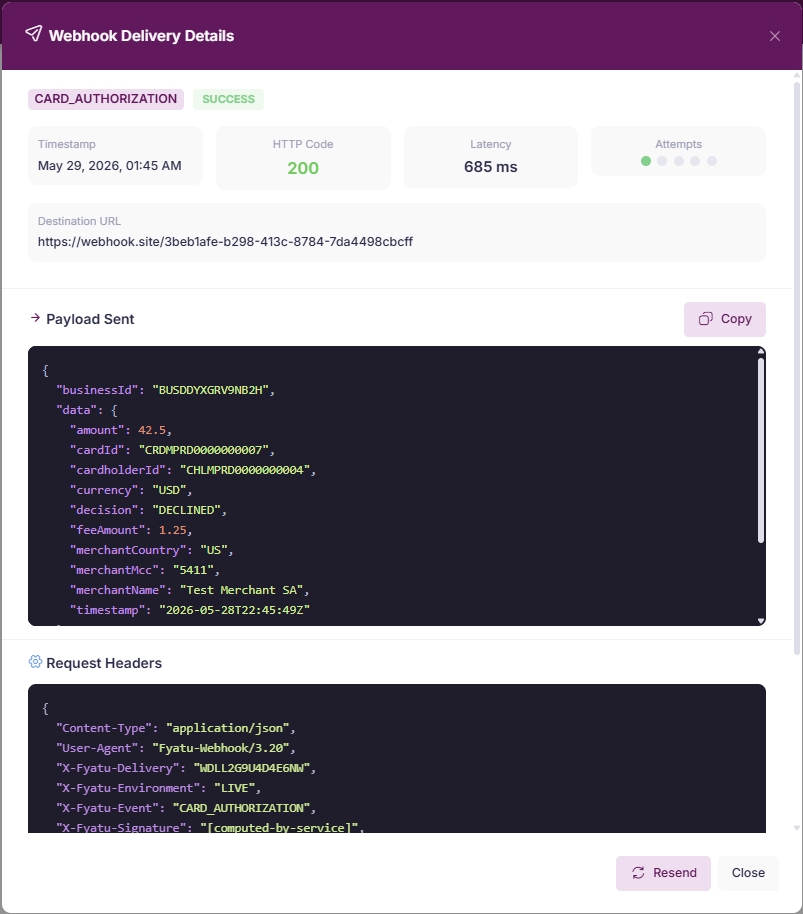
Each webhook endpoint has a **Deliveries** tab that shows every outbound payload with:
* Event type and payload
* HTTP response code from your server
* Latency
* Delivery status (`SUCCESS`, `FAILED`, `RETRYING`, `EXHAUSTED`)
Use the **Resend** button to replay any past delivery.
 ### Testing a Webhook
Click **Send Test Event** on any configured endpoint to send a synthetic payload and verify your server receives and processes it correctly before going live.
## API Request Logs
The **API Logs** section provides a searchable audit trail of every request made with your API keys:
| Field | Description |
| -------------- | -------------------------------------------------- |
| **Method** | `GET`, `POST`, `PATCH`, `DELETE` |
| **Path** | API endpoint called |
| **Status** | HTTP response status code |
| **Duration** | Request round-trip time in milliseconds |
| **Key** | API key prefix used |
| **IP Address** | Originating IP address |
| **Error Code** | Application-level error code if the request failed |
Logs are retained for 7 days.
### Testing a Webhook
Click **Send Test Event** on any configured endpoint to send a synthetic payload and verify your server receives and processes it correctly before going live.
## API Request Logs
The **API Logs** section provides a searchable audit trail of every request made with your API keys:
| Field | Description |
| -------------- | -------------------------------------------------- |
| **Method** | `GET`, `POST`, `PATCH`, `DELETE` |
| **Path** | API endpoint called |
| **Status** | HTTP response status code |
| **Duration** | Request round-trip time in milliseconds |
| **Key** | API key prefix used |
| **IP Address** | Originating IP address |
| **Error Code** | Application-level error code if the request failed |
Logs are retained for 7 days.