API v2 is deprecated. This version will be discontinued on December 31, 2026. Please migrate to API v3 for new features, improved security, and continued support. Quick Start Guide
This guide will walk you through issuing your first virtual card using the FYATU API. By the end, you’ll have:
- Made an authenticated API request
- Created a cardholder
- Issued a virtual Mastercard
Prerequisites
Before you begin, make sure you have completed the setup process:
Verify Your Identity (KYC)
Submit your identity documents to verify your account
Upgrade to Business
Upgrade your account to Business ($250 one-time setup fee)
Fund Your Wallet
Deposit USDT to your business wallet (minimum $10 to get started)
Step 1: Get Your Credentials
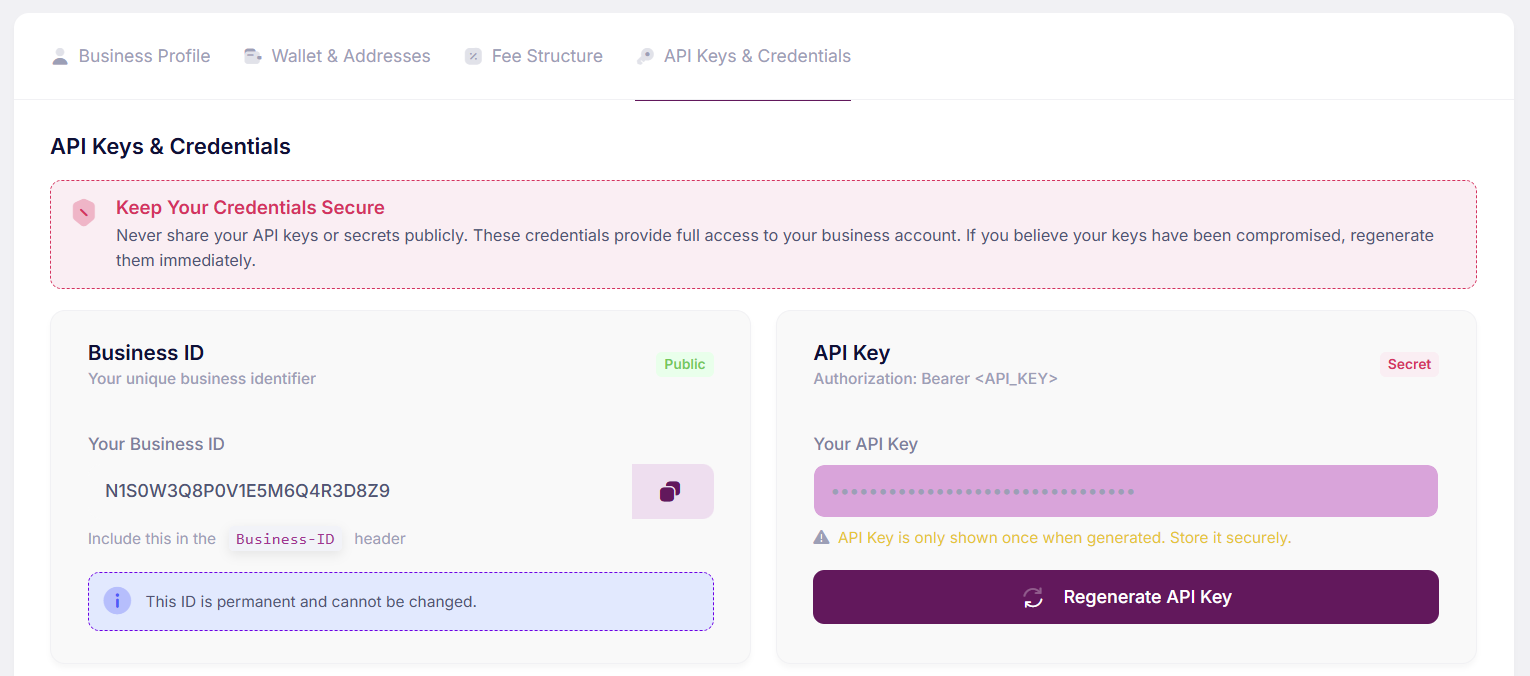
Log into your Business Settings to find your Business ID and API Key:
You’ll need both credentials for all API requests:
| Credential | Header | Example |
|---|
| Business ID | Business-ID | N1S0W3Q8P0V1E5M6Q4R3D8Z9 |
| API Key | Authorization | Bearer sk_live_xxxxxxxxxxxxx |
Keep your API key secret! It’s only shown once when generated. Never expose it in client-side code or public repositories.
Step 2: Test Your Connection
Let’s verify your credentials by fetching your account status:
curl -X GET "https://api.fyatu.com/api/v2/account/status" \
  -H "Business-ID: BUS_your_business_id" \
  -H "Authorization: Bearer sk_live_your_api_key"
{
  "status": "success",
  "statusCode": 200,
  "message": "Fetched Successfully",
  "data": {
    "businessId": "BUS_abc123",
    "businessName": "Your Company",
    "status": "ACTIVE",
    "subscription": {
      "plan": "BUSINESS_PRO",
      "remainingCards": "Unlimited"
    }
  }
}
Step 3: Create a Cardholder
Before issuing a card, you need to create a cardholder. This is the person who will use the card:
curl -X POST "https://api.fyatu.com/api/v2/cardholders" \
  -H "Business-ID: BUS_your_business_id" \
  -H "Authorization: Bearer sk_live_your_api_key" \
  -H "Content-Type: application/json" \
  -d '{
    "firstName": "John",
    "lastName": "Doe",
    "email": "[email protected]",
    "phone": "+12025551234",
    "dateOfBirth": "1990-05-15",
    "gender": "MALE",
    "address": "123 Main Street",
    "city": "New York",
    "state": "NY",
    "country": "US",
    "documentType": "PASSPORT",
    "documentNumber": "AB1234567"
  }'
cardholderId from the response - you’ll need it to create a card.
Step 4: Issue a Virtual Card
Now let’s create a virtual Mastercard for the cardholder:
curl -X POST "https://api.fyatu.com/api/v2/cards" \
  -H "Business-ID: BUS_your_business_id" \
  -H "Authorization: Bearer sk_live_your_api_key" \
  -H "Content-Type: application/json" \
  -d '{
    "cardholderId": "ch_from_previous_step",
    "nameOnCard": "JOHN DOE",
    "amount": 50.00,
    "cardType": "MASTERCARD",
    "cardUsage": "RELOADABLE",
    "spendingLimit": 5000,
    "spendingControl": "MONTH"
  }'
{
  "status": "success",
  "statusCode": 200,
  "message": "Card Issued Successfully",
  "data": {
    "cardId": "card_xyz789",
    "cardholderId": "ch_abc123",
    "cardName": "JOHN DOE",
    "maskedNumber": "XXXX XXXX XXXX XXXX",
    "balance": 50.00,
    "cardType": "MASTERCARD",
    "isReloadable": true,
    "status": "ACTIVE"
  }
}
Step 5: Get Full Card Details
To retrieve the full card number, CVV, and expiration date:
curl -X GET "https://api.fyatu.com/api/v2/cards/card_xyz789" \
  -H "Business-ID: BUS_your_business_id" \
  -H "Authorization: Bearer sk_live_your_api_key"
{
  "status": "success",
  "data": {
    "id": "card_xyz789",
    "cardNumber": "5234567890123456",
    "cvv": "123",
    "expiration": "12/28",
    "balance": 50.00,
    "status": "ACTIVE"
  }
}
Card details (number, CVV) are sensitive. Always handle them securely and never log or expose them.
What’s Next?