

API Keys
Creating an API Key
1
Go to API Keys
Click API Keys in the portal sidebar.
2
Click Create API Key
Give the key a descriptive name (e.g.
Backend — Production) and select the environment (Sandbox or Live).3
Select scopes
Choose the minimum set of scopes required for your integration. Follow the principle of least privilege.
4
Copy the secret
The full API key is shown once at creation. Store it securely in your server environment — it cannot be retrieved again.
Available Scopes
Key Lifecycle
Keys can be revoked at any time from the API Keys list. Always revoke before deleting to ensure no in-flight requests are impacted.
Webhooks
Creating a Webhook Endpoint
1
Go to Webhooks
Click Webhooks in the portal sidebar.
2
Click Create Endpoint
Enter your HTTPS URL and select the environment (Sandbox or Live).
3
Select events
Choose which event types to subscribe to — card events, cardholder events, transaction events, account events, and billing events.
4
Copy the signing secret
Use the webhook signing secret to verify HMAC-SHA256 signatures on incoming payloads. See Signature Verification.
Webhook Delivery & Retries
Fyatu delivers webhook payloads with at-most-once retry logic:
After 5 failed attempts the delivery is marked Exhausted. You can manually resend any delivery from the portal.
Delivery Logs
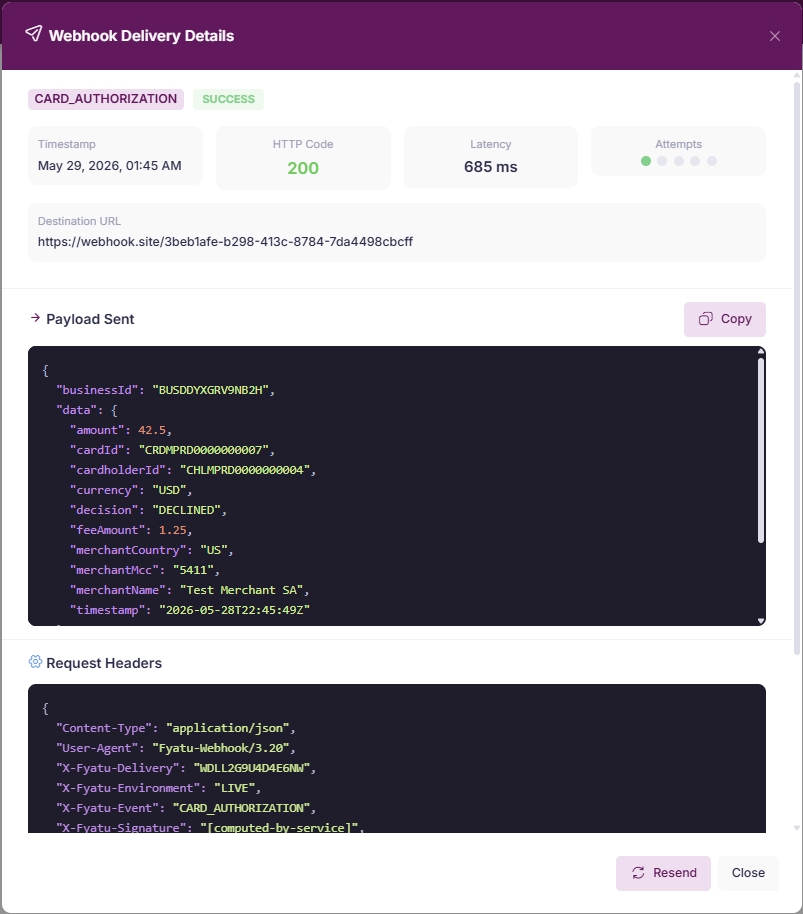
Each webhook endpoint has a Deliveries tab that shows every outbound payload with:- Event type and payload
- HTTP response code from your server
- Latency
- Delivery status (
SUCCESS,FAILED,RETRYING,EXHAUSTED)
Testing a Webhook
Click Send Test Event on any configured endpoint to send a synthetic payload and verify your server receives and processes it correctly before going live.API Request Logs
The API Logs section provides a searchable audit trail of every request made with your API keys:
Logs are retained for 7 days.